How Claude introduced me to a OOMKilled error
On Thursday, a colleague reported that he was having some errors on the frontend integration tests. The results showed 18 failing tests, all with the same error:
TimeoutError: waiting for locator('[id=\'kc-page-title\']') to be visible
This id is used in the integration test as reference to know whether the login page is visible and it was loaded. Because the login page is not provided by the frontend but by our Keycloak service, I suspected right away this should be related to infrastructure and not frontend changes.
Turning to Claude for help
Usually I find test errors rather quickly by looking at a screenshot or browser log error but this time I didn't find any useful error: the screenshots showed a blank page and the browser logs only showed a vague error 'Failed to load resource: the server responded with a status of 503'.
This is where I explained the problem to Claude, which it quickly confirmed was an infrastructure issue, and continued to iterate with it while investigating on my own.
On Wednesday, just the day before, I had pushed a change to increase the memory limit of our CMS container. Since this was the first time I encountered an issue like this, I wondered if this was related somehow. In retrospect, Claude was not that helpful when I mentioned this but in doing so I went back to the logs again and found the culprit:
Error when executing failure post condition:
    hudson.AbortException: Some pods rescheduled or restarted after integration test started
    Last Exit Code: "137" Reason: "OOMKilled" Message: "None"
I am a bit embarrassed to not have found this sooner and to be honest I didn't really know the error, but it was clearly the issue since it aligned with the test failure timeframe.
(I later learned that 137 isn't an arbitrary number either but a SIGKILL signal, common with OOMKilled errors which I'll get into at the end).
Hunting down memory usage
From this point on things got easier: Claude introduced me to an OOMKilled error and suggested a memory limit increase for the frontend container. But why?
To answer this, I had to look into our Prometheus logs to check exactly what the memory usage by the frontend was during the test timeframe. I had never done this before but I actually enjoyed it. Turns out that the frontend container was in fact going over the 32MB limit, at the same time the error occurred.
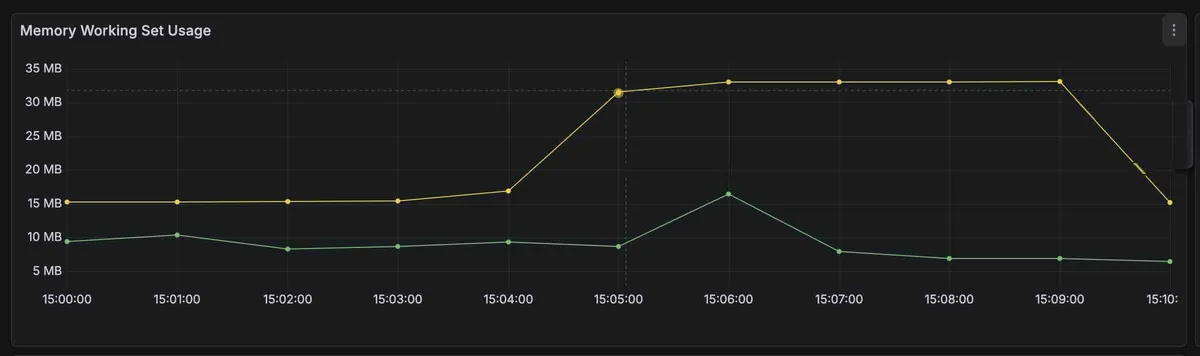
For the past week we have been rolling out a design system update that only recently started to be the default on our tests. While initially debugging, frontend logs even showed multiple heavy requests for CSS assets so this started to make sense given we had never had memory issues up until now.
Given these findings, doubling the memory limit on our frontend container indeed solved the failing tests. This was a simple issue, any experienced developer would probably have debugged the issue faster than I did. Nevertheless I am now familiar with our monitoring tools and what a OOMKilled error is! Speaking of which:
What is a OOMKilled error?
If you're like me and never heard of this error before and you're curious, here's my attempt at explaining it.
A OOMKilled error is thrown when a Kubernetes container exceeds its memory limit. Simple as that. What is interesting is that the underlying mechanism behind the error is not specific to Kubernetes but caused by the Linux kernel OOM Killer.
The OOM Killer is invoked when the system runs out of memory to give a process and the kernel steps in to kill something to recover it. That's why in the error I saw earlier, there is also an exit code 137 - 128 + 9 (SIGKILL), the signal the kernel uses to terminate de process.
The kernel decides what process to kill by giving each process a score - oom_score. The higher the score, the greater the chance the process is killed by the OOM Killer. This is also influenced by two other important rules:
Kill the least amount of processes needed to maintain system stability.
Kill the processes that allows gaining the most freed memory.
It is also possible to adjust the exact score value using oom_score_adj and be more precise about when processes should be terminated. Kubernetes takes advantage of this and is able to classify pods into three classes called Quality of Service (QoS):
- Guaranteed
- Burstable
- BestEffort
This can then help when checking a pod's status and understand potential failures.
There's much more to this topic that I won't go over here. I think this is a good summary of the error I encountered and it's been fun learning about this. See you around!